Meetings · Webinars · Live classes · Secure sessions
Meetings, webinars and live classes. And sessions nobody can leak anonymously.
A video platform for teams, creators, educators and businesses. HD meetings for up to 100 people, webinars for 5,000 and live classes for 10,000, in the browser and in apps for Android, iPhone, iPad and Mac — and an app-only secure mode where every frame carries an invisible mark that traces a leaked clip to the account.
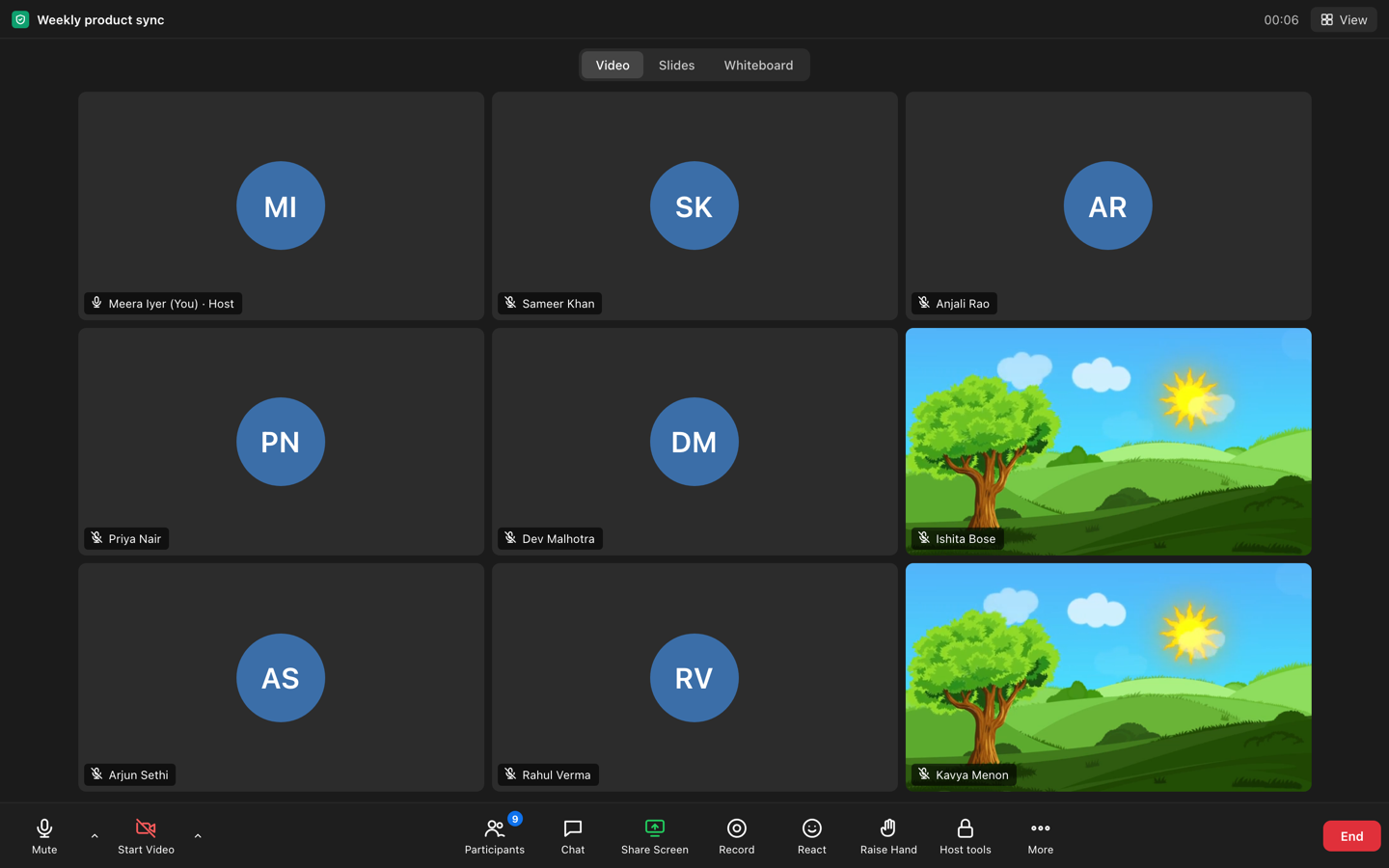
A real nine-person meeting in the browser: the gallery, the toolbar and the host tools people already know — plus incoming video you choose person by person, which Zoom does not offer.
100participants in a meeting, web and apps
5,000attendees on a webinar; 10,000 students in a live class
2–4 starget delay on the broadcast path
2.6 msmedian to draw the mark on a 1080p frame (Apple M3 Max; phones not yet measured)
Capture blocked on Android; blacked out on iPhone and iPad when recording starts
Every participant's view carries their own invisible mark
Leak cases resolve to an account after a person reviews them
leak-traceableAndroid · iPhone · iPad · Mac
Switching from Zoom?
What you use every day is here. Then it keeps going.
Move the meetings and webinars you already run, keep a free tier, and gain the things a general-purpose platform was never built for. Side by side, including what we do not do: Zoom · Google Meet · Microsoft Teams.
EXPECTED · AND HERE
The platform you know
HD meetings for 100 with screen share, chat, breakout rooms and cloud recording. Webinars with registration, Q&A and polls. Apps for Android, iPhone, iPad and Mac, plus the browser. A free tier: 10 meetings a month, up to 1 hour, 20 people. SDKs to put video in your own app.
ONLY HERE · SECURITY
Sessions nobody can leak anonymously
Secure mode is app-only: attested apps, per-session keys, capture blocked where the operating system allows it, and an invisible per-participant mark on every frame. In tests on synthetic video the mark survived messaging-app-quality re-encodes down to 240p, a crop and a simulated camera angle. Leak cases resolve to an account after a person reviews them.
ONLY HERE · SCALE & PRICE
Ten thousand students from a laptop, priced in rupees
Broadcast sessions fan out through a content network with a 2–4 second target delay: up to 5,000 in a webinar, 10,000 in a class. Meetings are per host per month; webinars per month plus attendee-hours; classes per active student — no seat licences, prices in rupees plus GST.
// the extraction service, on a leaked clip
{
  "ok": true,
  "frames": 60,
  // → one account, one session
  "watermark_id": "4079415784941142749",
  // a match: false-positive rate below 1e-9
  "tier": "match",
  "corrected_bits": 0,
  "epoch": 3,
  "resolved_to": {
    "session": "q3-product-review",
    "participant": "named only after human review"
  }
}
Honest limits. Traceability is the point; prevention is best-effort per operating system, and the mark has been tested on synthetic video, not yet on real camera footage. A person reviews every extraction result before anyone is named, and the apps tell participants that what they see is marked to them. Read the full security page →
Webinars and live classes at scale
Ten thousand students. One laptop. A normal connection.
The teacher's browser or Mac app sends the class once; Supermeet's servers package it and a content network fans it out with a 2–4 second target delay. Slides and whiteboard travel as data, not video, so they stay sharp on a phone.
10,000
students in a live class, 5,000 attendees in a webinar — the plan's limits, not a room server's.
1
host is all it takes; the audience is receive-only until you invite a raised hand onto the stage.
2–4 s
target delay from the presenter to the audience through the content network.
What a viewer can choose
Full video — the picture adapts to the connection
Data saver — a lower quality that uses less data
Audio only — the sound, with the slides and the whiteboard still drawn as data
Organizers pick the default per event; viewers switch whenever they like.
Hosting
Zero friction for audiences. Real controls for hosts.
Webinars people actually join
A registration page for each event, email reminders, and a join link that opens in any browser with no install. Presenters share camera and screen; the audience gets Q&A, polls and reactions.
Presenters on a stage the host switches live: grid, interview, speaker and screen
A practice session before you go live; livestream out to YouTube or any RTMP or SRT address
Replays behind the same registration
Meetings, with secure mode when it counts
Up to 100 participants from the web or the apps, cloud recording on paid plans, and the same members and roles as everything else. Choose a secure meeting and it becomes app-only and leak-traceable.
Screen share, chat, breakout rooms, polls
Recordings kept exactly as long as your retention policy says
Waiting room, co-hosts, focus mode and incoming video you choose person by person
Developers
Put video — and leak-traceable sessions — inside your own app.
The same SDKs our apps are built on, for Android, iPhone, iPad, Mac and the web. Your backend creates sessions and mints join grants; your app joins, plays and draws the mark. Roles are decided on the server, never on the device.
Client SDKs: attested join, secure playback, capture guard, the render-pass mark, real-time publish and subscribe
Host SDK: sessions in your tenant, single-use join grants, signed webhooks
Register your app builds once; leaks trace to the app and the account
let client = SupermeetClient(config: .init(apiBaseURL: api, appID: "TEAMID.com.yourcompany.app", sdkBuild: 1))
let r = try await client.join(sessionID: sid, role: .attendee, identity: "user-42",
                              deviceID: deviceID, attest: appAttest, grant: grantFromYourBackend)
guard r.allowed, let hls = r.hlsUrl else { return showInstallFunnel(r.reason) }
let item = SecurePlayback.makeItem(playbackURL: URL(string: hls)!, keyLoader: loader)
let renderer = try WatermarkRenderer(device: MTLCreateSystemDefaultDevice()!,
                                     params: try WatermarkParams(sessionKeyHex: r.watermarkKeyHex!,
                                                                 watermarkID: r.watermarkId!, profile: r.watermarkProfile))
// SecureVideoView(player:output:renderer:) draws the mark on every frame before it is shown
val client = SupermeetClient(SupermeetClient.Config(apiBase, appId = "com.yourcompany.app", build = 1), PlayIntegrityAttestation(ctx))
SecureWindow.protect(activity) { event -> if (event.blank) player.volume = 0f }   // before the first frame
val r = client.join(sessionId, identity = "user-42", deviceId = DeviceIdentity.of(ctx), grant = grantFromYourBackend)
if (!r.allowed) showInstallFunnel(r.reason)
else {
  player.setVideoEffects(listOf(WatermarkEffect(WatermarkParams.fromJoin(r.watermark_key_hex!!, r.watermark_id!!, r.watermark_profile))))
  player.setMediaSource(SecurePlayback.mediaSource(r.hls_url!!, r.hls_key_url!!, r.hls_access_token!!))
}
import { SupermeetHost } from '@supermeet/host-sdk';
const host = new SupermeetHost({ apiBase: 'https://api.supermeet.io', apiKey: process.env.SUPERMEET_API_KEY!, developerId: 'dev_123' });
const s = await host.sessions.create({ product: 'webinar', title: 'Launch — spring collection' });
await host.sessions.start(s.id, { host_platform: 'macos' });          // ingest + playback for the host
const { grant } = await host.grants.mint({ session_id: s.id, identity: 'user-42', role: 'attendee' });
// hand `grant` to your app: the SDK joins with it — session, identity and role are fixed server-side
app.post('/hooks/supermeet', (req, res) => verifyWebhook(req.header('X-Supermeet-Signature'), req.rawBody, secret))
Privacy and data
Servers in India. Participants never profiled.
IN
Servers in India
The application and its database run in Bengaluru. Recordings are kept in object storage whose location is not limited to India, and a content network delivers media worldwide.
TTL
Retention with a clock
Recordings expire on your policy, with an email 48 hours before; mark-to-account maps after 12 months; every erasure request ends with a signed certificate.
90d
A grievance contact you can reach
privacy@supermeet.io, answered within 90 days; a written breach process with a 72-hour clock; designed around India's Digital Personal Data Protection Act.
18
Extra care when your audience includes minors
For learners under 18, the organization records guardian consent using guardian identities it already holds. No behavioural profiling, no advertising, no cross-session tracking — for everyone.
Pricing
Per host for meetings. Per attendee-hour for webinars. In rupees.
Meetings
Free 10 a month · 1 hour · 20 people · no sign-in
Pro ₹1,100 per host per month (up to 100 participants, 720p, cloud recording); Business ₹1,500 (1080p, webinars and live classes, roles and usage). Pro is 20% below Zoom Pro.
Web and apps, screen share, chat, polls, host controls
₹599 a month · 1,000 attendee-hours included · then 30 paise per attendee-hour
No event licence: a 5,000-person, 90-minute webinar is about ₹2,549. Live classes at ₹45 per active student per month. Up to 5,000 attendees per webinar and 10,000 students per class.